macOS
Apple silicon · macOS 13 or later
DMG · signed and notarized
 AirWiki
View source
AirWiki
View source
Team docs. Study notes. Project decisions.
Help colleagues find answers across teams. Share your study notes with other students. Give your coding assistant lasting project context. AirWiki makes it searchable, with you in control of access.
Built on Open Knowledge Format (OKF), the open standard introduced by Google Cloud.
For teamsFor studentsFor developers
Technical beta 0.3 · macOS signed and notarized · Windows unsigned · Manual updates
Apache-2.0Open source
OKF v0.2Open standard introduced by Google Cloud
Local by defaultNo account required
Human reviewBefore search or sharing
Free · Open source · Technical beta
Try the technical beta shown in this tour. Choose your installer below: direct downloads, with no account or sign-up required.
Version 0.3.0-rc.2 is a technical beta with manual updates, not a supported stable release. Local AI assets download separately during setup. Keep your operating system's security protections enabled; if Windows blocks the unsigned installer, follow your device's policy.
Put your knowledge to work
The explanation already exists. Help the next person, or their AI assistant, find it. These example workflows show what to explore in the technical beta.
Teams · Private LAN sharing
Support needs an answer that engineering has already documented.
Example question“How do we recover a failed import?”
Engineering reviews its troubleshooting Wiki and grants access to verified colleagues on the local network. Support can search it and read the explanation. A connected assistant can retrieve the evidence when the owner permits that AI access.
Give colleagues a way to find answers without asking you to resend the same docs. Each owner chooses which wikis to share.
Private sharing currently uses authorized LAN devices. There is no SSO or managed private network between offices.
Explore private sharingStudents · Public discovery
A clear explanation can help classmates and students taking the same subject elsewhere.
Example question“Why does this database need normalization?”
Turn your own notes into a Wiki, review the concepts, and choose to publish it to the experimental public network. Other students can discover the topic and read your explanation with its sources. AI study apps can search it when public search is enabled.
Build on what other students have already worked through. Keep personal notes private and publish only material you have the right to share.
Public sharing is experimental. Publishers must be reachable through configured indexes; there is no supported always-on relay service. Readers can retain published content.
Explore public discoveryDevelopers · Project memory
The README explains setup. Your project memory keeps the reasoning behind decisions.
Example question“Why do imports run in a background worker?”
Initialize a portable .airwiki Wiki in your repository. Authorize Codex, Claude Code, or Gemini CLI to capture confirmed decisions and consult them in later tasks. Review that knowledge as readable files alongside your code.
Spend less effort rebuilding context in every conversation. Keep conventions, architecture decisions, and reusable procedures available across compatible tools.
You control what enters Git. AirWiki never commits or pushes; a new clone needs local approval before an assistant can use its memory.
Explore project memoryTry these workflows with synthetic material first. Read the beta evaluation FAQ.
What “useful to AI” means
Connect a compatible AI app through MCP, the connection protocol used by AI tools. It can retrieve relevant passages with source references from the knowledge it is allowed to access, as it works.
AirWiki prepares and searches knowledge locally. A connected cloud AI provider may process evidence its app receives. This is retrievable context, not model training or a measured claim of token savings.
An open foundation · OKF v0.2
AirWiki uses Open Knowledge Format (OKF), an open specification introduced by Google Cloud for knowledge that people and AI agents can read. It gives your team docs, study notes, and project decisions a common structure, independent of a particular AI model or cloud provider.
Google Cloud's introduction Read the open specification
AirWiki is an independent implementation. See AirWiki's OKF v0.2 compatibility profile.
From files to a useful Wiki
Bring a folder of Markdown or text-based PDFs, import an OKF Wiki, or create memory with an authorized assistant. Local AI helps prepare it; you review folder-derived concepts before they enter search.
Create a wiki from a folder, an OKF bundle, or explicitly initialized personal or project memory.
See supported starting pointsAutomation prepares draft knowledge. Source evidence stays visible while you approve, leave for later, or exclude it.
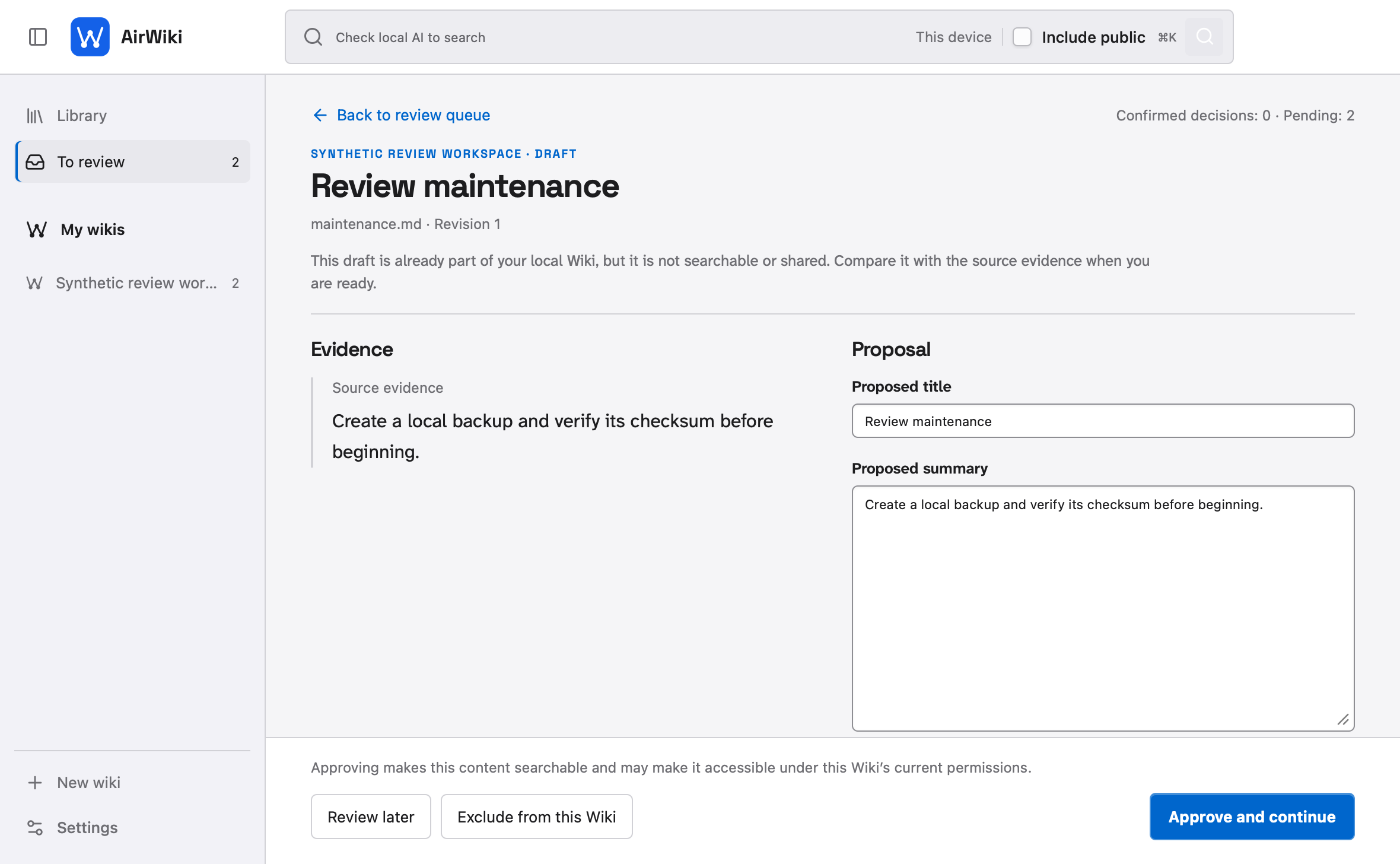
Search stable local knowledge first. Nearby or public sources require their own separate, explicit permissions.
Read the search and federation guideA short, synthetic-data tour
The 0.3 desktop redesign keeps your Wiki index beside the article, gathers pending proposals in To review, and remembers your last local reading.
Private by default
Read the privacy policy · Read the threat model · Report a security issue privately
Clear limits are part of the product
No stable desktop download today. The public technical beta is for evaluators and is never selected by the updater.
No cloud sync, accounts, SSO, or web/mobile apps. AirWiki is a local desktop application.
No automatic publishing or access grants. A local model can propose metadata, not make trust decisions.
No arbitrary remote editing. MCP mutation is limited to explicitly authorized personal or project memory wikis.
Questions before evaluation
No. AirWiki has no supported stable public release. The available technical pre-releases are manual test candidates only.
No. Preparation and retrieval run locally. Sharing exposes the published Wiki; original source files stay on their owner's device. Connected AI apps may receive permitted evidence, which a cloud AI provider may process.
No. AI-app access, LAN sharing, Internet exposure, and public-query search are separate decisions with their own controls.
Read the support guide, inspect open issues, or consult the evaluation guide.
About this website
This official AirWiki project page is hosted by GitHub Pages. The AirWiki project does not use analytics, cookies, forms, remote fonts, or third-party scripts here, and the project does not receive visitor-level request logs from this site.
GitHub processes ordinary request metadata, such as IP addresses and browser information, to operate and secure Pages under the GitHub General Privacy Statement. Links away from this page are governed by their destination. For help, use the public support route with synthetic material only; report security concerns through the private security route.
Help shape AirWiki
Explore the source or evaluate the technical beta with sample material. Tell us where your team, study group, or coding assistant loses useful context, and help improve that workflow.